

TLDR Classic
Write what you spend.
TLDR Classic is an expense tracker for couples and individuals. Type a line like “coffee 4.50” and it’s saved: it works out the amount, category and day, and shows where your month goes. No ads. Nothing sold.


Write it any way
Type what you spent the way you’d say it, and it’s saved. “coffee 4.50”, “taxi 18 yesterday”, “groceries 62 #home”: TLDR Classic reads the amount, the category, the day and any tags, and puts it in your month. Or say it: speech is turned into text on your phone.

See where it goes
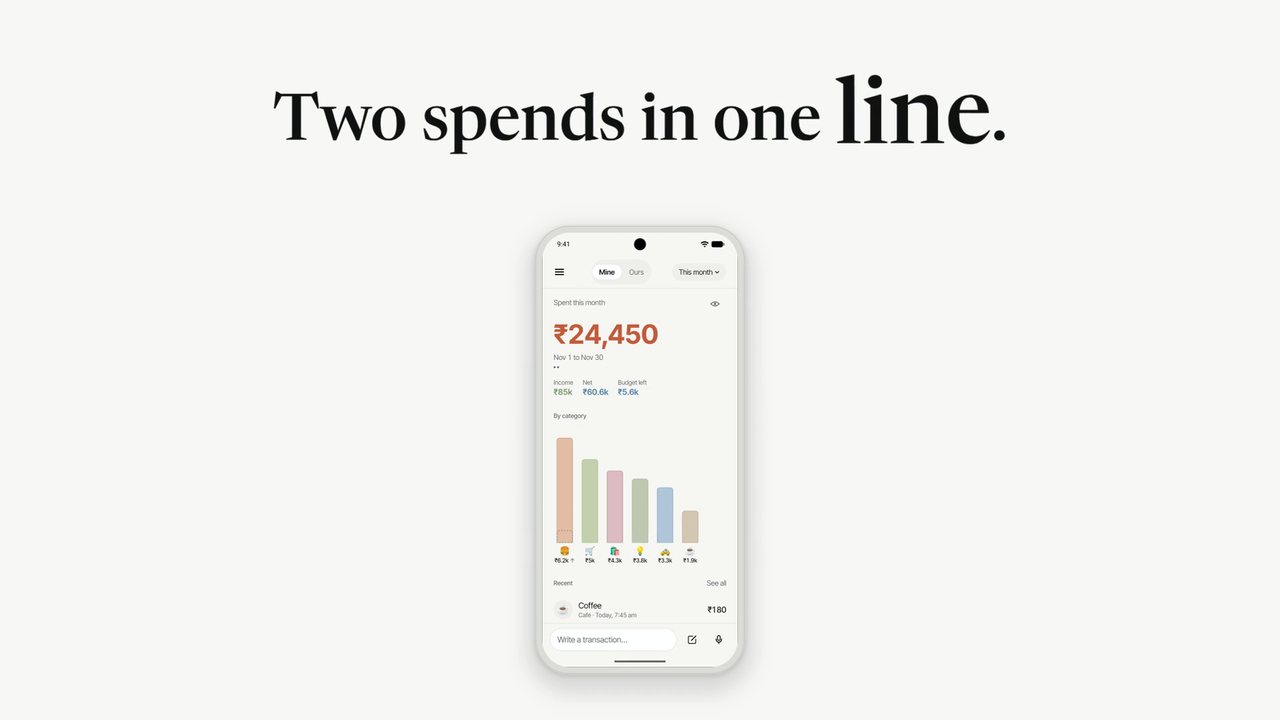
Home shows this month’s spending, your income and net, how much budget is left, and a bar for every category, biggest first. Tap a bar to see its entries. Every figure is worked out on your phone.

Share a ledger (Pro)
Share one ledger, Ours, with a partner and keep your own, Mine, private. See who added what, on Android or iPhone. On iPhone, get a quiet note when they add an entry. More for couples: how to budget as a couple, a budget app for couples and a shared expense tracker.

Logs itself (Pro)
In rupees, share a UPI payment screenshot to TLDR Classic. The amount, the payee and the time are read on your phone for you to confirm, and the screenshot is never uploaded.
On iPhone, set up a Shortcuts automation once and tap-to-pay purchases with Apple Pay are logged for you.

Log it in a tap
Home screen widgets with two quick-add buttons, on Android and iPhone. On Android, a Quick Settings tile and app shortcuts log a spend in a second. On iPhone there are Lock Screen widgets too, and a Control Centre button, the Action button and Siri log a spend on any plan.

Budgets, lists and reminders
Set a monthly budget and budgets per category. Keep a list of planned purchases. Choose a reminder, or none. Budget alerts come on iPhone only.

Android and iPhone
On Android and iPhone. It is the same app on both, on the same servers, and a shared ledger works across the two. On both, it works offline and syncs when you’re back online, keeps over 35 currencies with rupees in lakhs and crores, brings in a CSV or Excel file from another app, and makes a recap card of your month to save or share. A few things depend on the phone.
| Feature | Android | iPhone |
|---|---|---|
| Download | Google Play | App Store |
| Type it, say it, or use the form | Yes | Yes |
| Home, Analyze, Ask, budgets, lists and reminders | Yes | Yes |
| Home screen widgets with quick-add | Yes | Yes |
| UPI screenshots (Pro, in rupees) | Yes | Yes |
| Ours, a ledger shared with one partner (Pro) | Yes | Yes |
| Quick Settings tile and app shortcuts | Yes | No |
| Lock Screen widgets, Control Centre and the Action button | No | Yes |
| Siri | No | Yes |
| Apple Pay automation (Pro) | No | Yes |
| Budget alerts and partner notes | No | Yes |
| Sign in with | Apple | |
| App lock | Fingerprint, face or screen lock | Face ID, Touch ID or passcode |
| Billing | Google Play | App Store |
More on each: TLDR Classic on Android, logging a UPI payment from its screenshot, and a shared ledger for couples. Pro costs the same on both: US$3.99 a month or US$24.99 a year (₹399 or ₹2,999 in India).
Private by design
No ads. Nothing sold. There is no bank login, and the app never reads your SMS or your email. Most lines are read on your phone. Only a line it can’t read, an Ask question or an entry name it can’t place goes to Claude, by Anthropic, and only after you agree; never your totals, and Anthropic doesn’t use any of it to train its models. Speech is turned into text on the phone, and the audio is never recorded or sent.
Your entries sync through servers in Mumbai. You can download all of it, or delete your account, from inside the app. The privacy policy has the details, and a budget app without a bank link shows how it works day to day.
Every new account gets Pro free for 30 days, no card needed.
Free
Unlimited entries, this month and last, 30 AI-read entries and 5 Ask questions a month, budgets, repeating entries, tags, lists, widgets and your full data download.
Pro
US$3.99 a month or US$24.99 a year
All your history, longer periods in Analyze, AI entries and Ask with no monthly limit, a ledger shared with one partner, UPI screenshots in rupees, bill photos, CSV and PDF export, and Apple Pay automation on iPhone.
In India, Pro is ₹399 a month or ₹2,999 a year. Your store shows your price before you buy. Billed by Google Play on Android and the App Store on iPhone.